---
title: Como cadastrar biometria facial pelo Aplicativo
description: Como fazer o cadastro do reconhecimento facial pelo nosso app onsafety no seu dispositivo android (Celular ou Tablet)
---
[Pular para o conteúdo](https://atendimento.onsafety.com.br/como-cadastrar-biometria-facial-pelo-aplicativo#main-content)
Português - Brasil
Mostrar submenu para traduções
[Abrir um Chamado](https://atendimento.onsafety.com.br/kb-tickets/new?hsLang=pt-br)

- [Tíquetes](https://atendimento.onsafety.com.br/ticket)
- [Sistema OnSafety](https://app.onsafety.com.br/)
- [App OnSafety](https://play.google.com/store/apps/details?id=br.com.igtech.nr18)
- [Sair](https://atendimento.onsafety.com.br/_hcms/mem/logout)
Abrir navegação principal
Fechar navegação principal
- [Tíquetes](https://atendimento.onsafety.com.br/ticket)
- [Sistema OnSafety](https://app.onsafety.com.br/)
- [App OnSafety](https://play.google.com/store/apps/details?id=br.com.igtech.nr18)
- [Sair](https://atendimento.onsafety.com.br/_hcms/mem/logout)
- Português - Brasil
Mostrar submenu para traduções
- [Abrir um Chamado](https://atendimento.onsafety.com.br/kb-tickets/new)
- Nosso contato
Nosso contato
Como podemos ajudá-lo?
- Não há sugestões porque o campo de pesquisa está em branco.
1. [Central de ajuda](https://atendimento.onsafety.com.br/?hsLang=pt-br)
2. [Trabalhador](https://atendimento.onsafety.com.br/trabalhador?hsLang=pt-br)
# Como cadastrar biometria facial pelo Aplicativo
## Como fazer o cadastro do reconhecimento facial pelo nosso app onsafety no seu dispositivo android (Celular ou Tablet)
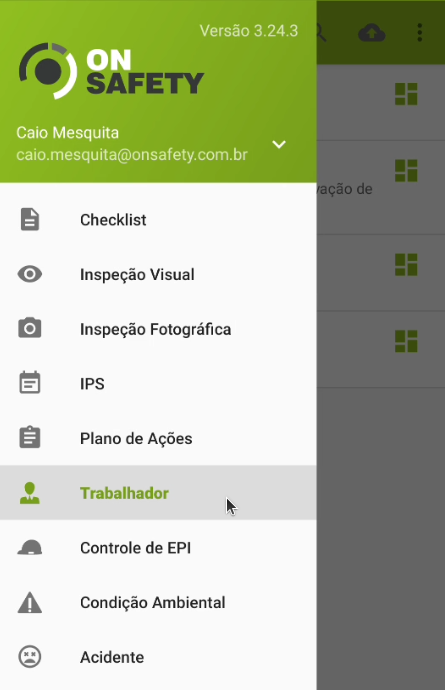
Dentro do Aplicativo OnSafety, acesse o menu de Trabalhador como mostra o print a seguir:
Clique no nome do trabalhador que deseja cadastrar a biometria facial.

Depois de fazer isso, vai abrir a tela de alteração dos dados do trabalhador. Clique nos "Três pontinhos" canto superior direito da tela.
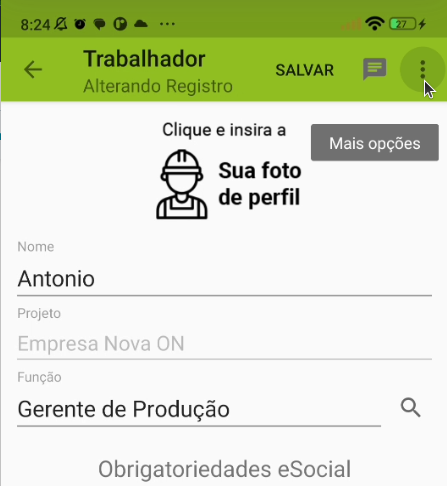
E por último, dentre as opções que aparecer, clique em **"Cadastrar face"**.

O sistema vai pedir permissão para acessar a câmera do seu dispositivo, e vai abrir a tela de reconhecimento facial para cadastrar o rosto da pessoa.
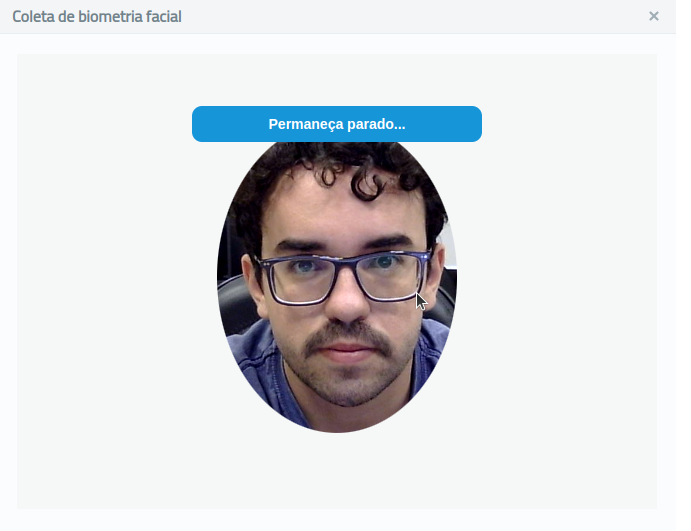
Siga as instruções e posicione o rosto de forma correta, e pronto! Estará com a biometria facial cadastrada.
- [Versões OnSafety](https://atendimento.onsafety.com.br/vers%C3%B5es-onsafety?hsLang=pt-br#main-content)
- [Última Versão](https://atendimento.onsafety.com.br/vers%C3%B5es-onsafety?hsLang=pt-br#%C3%BAltima-vers%C3%A3o)
- [Versões anteriores](https://atendimento.onsafety.com.br/vers%C3%B5es-onsafety?hsLang=pt-br#vers%C3%B5es-anteriores)
- [Geral](https://atendimento.onsafety.com.br/geral?hsLang=pt-br#main-content)
- [Usuários](https://atendimento.onsafety.com.br/geral?hsLang=pt-br#usu%C3%A1rios)
- [Controle de EPI](https://atendimento.onsafety.com.br/controle-de-epi?hsLang=pt-br#main-content)
- [Configurações](https://atendimento.onsafety.com.br/controle-de-epi?hsLang=pt-br#configura%C3%A7%C3%B5es)
- [assinatura](https://atendimento.onsafety.com.br/controle-de-epi?hsLang=pt-br#assinatura)
- [Inspeção](https://atendimento.onsafety.com.br/inspe%C3%A7%C3%A3o?hsLang=pt-br#main-content)
- [Relatórios e Indicadores](https://atendimento.onsafety.com.br/inspe%C3%A7%C3%A3o?hsLang=pt-br#relat%C3%B3rios-e-indicadores)
- [Inspeção Visual](https://atendimento.onsafety.com.br/inspe%C3%A7%C3%A3o?hsLang=pt-br#inspe%C3%A7%C3%A3o-visual)
- [Plano de ação](https://atendimento.onsafety.com.br/inspe%C3%A7%C3%A3o?hsLang=pt-br#plano-de-a%C3%A7%C3%A3o)
- [Checklist](https://atendimento.onsafety.com.br/inspe%C3%A7%C3%A3o?hsLang=pt-br#checklist)
- [eSocial](https://atendimento.onsafety.com.br/esocial?hsLang=pt-br#main-content)
- [Erros](https://atendimento.onsafety.com.br/esocial?hsLang=pt-br#erros)
- [Criação](https://atendimento.onsafety.com.br/esocial?hsLang=pt-br#cria%C3%A7%C3%A3o)
- [CAT](https://atendimento.onsafety.com.br/esocial?hsLang=pt-br#cat)
- [Trabalhador](https://atendimento.onsafety.com.br/trabalhador?hsLang=pt-br)
- [Plano de Ação](https://atendimento.onsafety.com.br/plano-de-a%C3%A7%C3%A3o?hsLang=pt-br)
- [Treinamento](https://atendimento.onsafety.com.br/treinamento?hsLang=pt-br#main-content)
- [Configuração](https://atendimento.onsafety.com.br/treinamento?hsLang=pt-br#configura%C3%A7%C3%A3o)
- [Projeto/Estabelecimento](https://atendimento.onsafety.com.br/projeto-estabelecimento?hsLang=pt-br)
- [PGR](https://atendimento.onsafety.com.br/pgr?hsLang=pt-br)
- [Controle de Documentos](https://atendimento.onsafety.com.br/controle-de-documentos?hsLang=pt-br#main-content)
- [Configurações](https://atendimento.onsafety.com.br/controle-de-documentos?hsLang=pt-br#configura%C3%A7%C3%B5es)
- [Notificação](https://atendimento.onsafety.com.br/controle-de-documentos?hsLang=pt-br#notifica%C3%A7%C3%A3o)
- [IPS](https://atendimento.onsafety.com.br/ips?hsLang=pt-br#main-content)
- [Configurações](https://atendimento.onsafety.com.br/ips?hsLang=pt-br#configura%C3%A7%C3%B5es)
- [Eleição de CIPA](https://atendimento.onsafety.com.br/elei%C3%A7%C3%A3o-de-cipa?hsLang=pt-br)
- [Investigação de Acidente](https://atendimento.onsafety.com.br/investiga%C3%A7%C3%A3o-de-acidente?hsLang=pt-br#main-content)
- [Configuração](https://atendimento.onsafety.com.br/investiga%C3%A7%C3%A3o-de-acidente?hsLang=pt-br#configura%C3%A7%C3%A3o)
- [PCMSO](https://atendimento.onsafety.com.br/pcmso?hsLang=pt-br)
- [Terceiros](https://atendimento.onsafety.com.br/terceiros?hsLang=pt-br#main-content)
- [Usuário](https://atendimento.onsafety.com.br/terceiros?hsLang=pt-br#usu%C3%A1rio)
- [Ordem de Serviço](https://atendimento.onsafety.com.br/ordem-de-servi%C3%A7o?hsLang=pt-br)
- [DDS](https://atendimento.onsafety.com.br/dds?hsLang=pt-br)
- [Saúde](https://atendimento.onsafety.com.br/sa%C3%BAde?hsLang=pt-br)
[](http://onsafety.com.br)
[mailto:email@email.com](mailto:email@email.com)
Copyright © 2025, OnSafety - IG Tech Sistemas